
Seize your agency's edge with 2025's elite White Label Platforms For Google Business Profile that transform local visibility—but which ones truly deliver?

Last updated: August 10, 2026
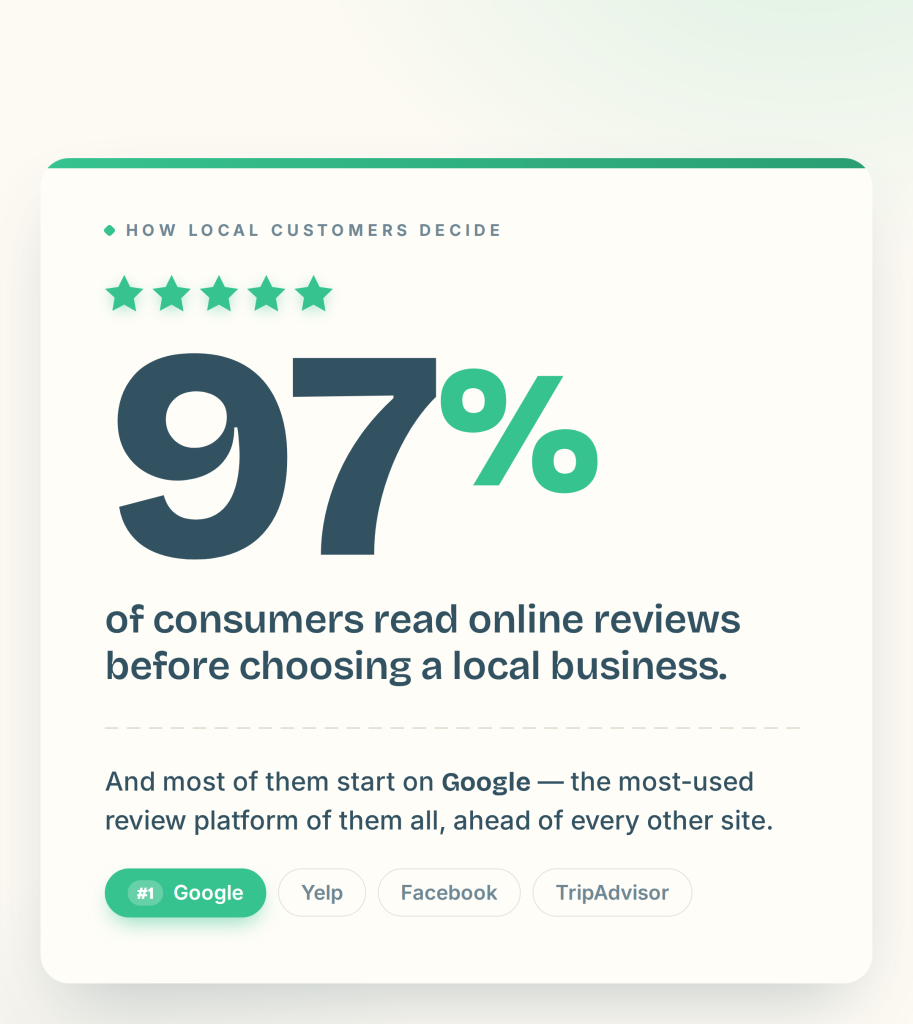
The purchase likelihood for a product with five reviews is 270% greater than the purchase likelihood of a product with no reviews, and that effect is strongest for small businesses. Google review management is the repeatable system you use to capture, monitor, respond to, generate, and defend those reviews. This guide walks through that system as five ordered steps, plus copy-paste response templates, a review-request timing table, and how to dispute fake reviews.
Before you respond to or request anything, configure your workflow so every new review reaches you instantly.
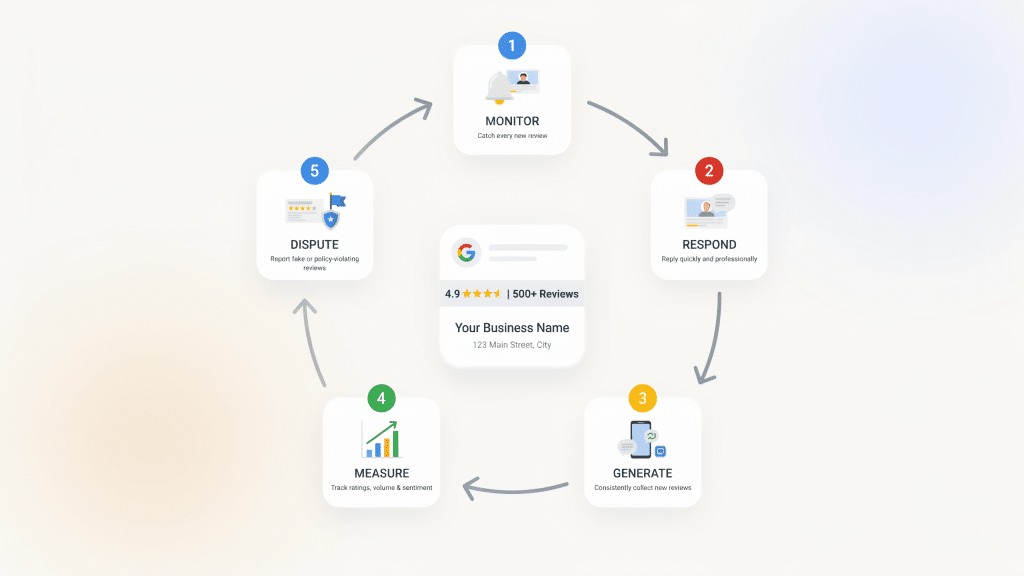
A single monitoring layer is what makes the next four steps possible — you cannot respond to, measure, or dispute what you never see.
Respond to every review, positive or negative, within 24–48 hours. Fast, personalized replies reinforce trust and signal operational excellence to both customers and Google. Use the two templates below as starting points and edit the bracketed fields for each reply.
Hi [Customer Name], thank you so much for the kind words! We're thrilled you had a great experience with [product/service]. Our team at [Business Name] works hard to deliver exactly this, and reviews like yours make it worthwhile. We look forward to seeing you again soon.
Hi [Customer Name], thank you for taking the time to share this, and we're sorry your experience with [product/service] fell short. This isn't the standard we hold ourselves to at [Business Name]. We'd like to make it right — please reach out to us at [email/phone] so we can resolve this directly. Thank you for helping us improve.
Keep replies aligned with your brand voice. AI-suggested drafts can speed this up while keeping tone consistent, but always personalize before you publish.
Volume and recency are what move your rating and your local ranking. The most reliable way to generate reviews is a multi-touch request sequence timed around the customer's experience rather than a single ask. Use this schedule:
| Touchpoint | Timing | Action |
|---|---|---|
| Point of sale | At purchase / service completion | Ask in person and hand over a QR code, NFC tag, or review plate for instant submission |
| Day 1 | 24 hours after | Send an automated SMS invitation with your direct review link |
| Day 2 | 48 hours after | Send a follow-up SMS to non-responders |
Locate your direct review link inside your Google Business Profile (the clean short-URL customers can use in one tap), and provide AI-crafted templates so customers know what to write. Automating SMS invitations after each purchase, plus in-store QR codes and kiosks, significantly lifts both the rate and quality of reviews collected.
With our experience, we do not recommend sending more than two request (Initial and follow up) as if a customer does not leave a review after the initial and follow-up request, the chance of them leaving a review is significantly decreased to the point where outreach is no longer of value.
Treat review management as a continuous, data-driven loop rather than sporadic outreach. Track a small set of KPIs, set a target for each, and adjust operations based on what they tell you.
| KPI | What it measures | Target to aim for |
|---|---|---|
| Review volume | New reviews generated per month | Steady month-over-month growth |
| Average star rating | Overall reputation score | 4.5+ stars |
| Response rate | Share of reviews that get a reply | 100% |
| Response time | How fast you reply after a review posts | Within 24–48 hours |
| Review velocity | Consistency of incoming reviews | A regular, recent flow — no long gaps |
| Sentiment trend | Direction of positive vs. negative themes | Positive share rising over time |
| Review request conversion | Share of requests that become reviews | Improving each quarter |
Use these signals to refine the business itself — packaging, staffing, or process changes — not just your review workflow. Centralized dashboards make this practical for agencies and multi-location operators who need oversight across every branch in one place.
Not every review is legitimate, and Google will remove those that violate its policies. Knowing what qualifies — and how to escalate — protects your rating from spam, competitors, and abuse.
What Google will and won't remove. Google removes reviews that break its content policies: spam and fake engagement, off-topic or irrelevant content, conflicts of interest, harassment, hate speech, and other prohibited content. Google will not remove a review simply because it is negative or you disagree with it. An honest bad experience is not a policy violation.
Document each dispute so you have a record if a pattern of policy-violating reviews emerges.
The five steps above are the system. These are the plays that separate businesses with a good rating from businesses that compound their reputation month over month.
A bad review isn't the end of the conversation — it's the start of a recovery sequence. The goal is to turn an unhappy customer into a public example of how you handle problems. Work through all four stages.
Stage 1 — Public reply within the hour. Respond fast and publicly so anyone reading sees you're engaged. Keep it short and move the conversation offline.
Hi [Customer Name], we're sorry this didn't go the way it should have. This isn't the experience we want anyone to have at [Business Name]. I'd like to look into it personally — please reach me at [email/phone] and we'll make it right.
Stage 2 — Private resolution within 24–48 hours. Call or message the customer directly, listen, and fix the underlying issue. This happens off the review page.
Stage 3 — Public follow-up once resolved. Return to the original review and add a brief, factual update so future readers see the outcome.
Following up here for anyone reading: we connected with [Customer Name] directly and resolved [issue]. Thank you for giving us the chance to put it right — it's helped us improve how we handle [process].
Stage 4 — Ask for an update one week later. Once the customer is satisfied, invite them to revise their review. This is the highest-leverage message in the whole protocol, and most businesses never send it.
Hi [Customer Name], thank you again for working with us to sort out [issue] last week. If you feel we turned things around, we'd be grateful if you'd consider updating your review to reflect your latest experience — no pressure at all, and thank you either way.
Your competitors' reviews are free market research. Once a month, read the recent reviews on your two or three closest competitors and note what customers complain about most — slow service, hidden fees, poor communication. Then build the fix directly into your offer and say so in your own review responses. If customers routinely fault a competitor for slow turnaround, make same-day service a visible promise and reinforce it every time a happy customer mentions speed.
You can shape what customers write without scripting them. At the point of asking, prompt them toward the specifics that help you rank and convert: "If you loved our same-day service, it really helps others to mention it." Customers given a gentle nudge write more detailed, keyword-rich reviews. Then close the loop in your replies by echoing that language naturally — mentioning the service, product, or location in your response reinforces the same terms customers and Google are reading.

At its core, review management is the strategic process of soliciting, monitoring, and responding to online reviews—especially on Google, and industry-specific platforms—to protect and enhance your brand reputation.
As detailed in our Brand Reputation & Review Management Software article, strong review management delivers real-time insights and helps you turn customer feedback into growth opportunities
Positive reviews not only influence customer trust but also improve local SEO ranking: studies show the purchase likelihood for a product with five reviews is 270% greater than the purchase likelihood of a product with no reviews; this effect is especially powerful for small businesses.
Real world example of this is can be seen from a Multi location Smog shop that has been utilizing reviewly.ai for over a year and has generated nearly 1000+ reviews across both of their locations and have seen a increase of around 25% of visitors to the shop from prior of using reviewly. Truly showcasing the effect reviews can have for small businesses.
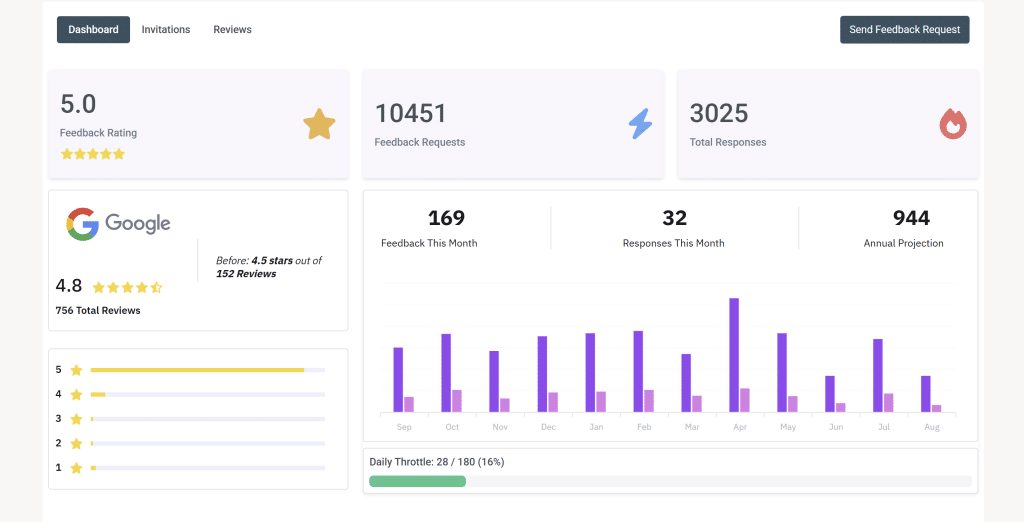
Dashboard Of One Of Two Locations Of Smog Shop
Key benefits include:
Google review management software centralizes the entire system above into one platform. It aggregates reviews from Google and other sources into a single dashboard, sends real-time alerts when new reviews arrive, automates review requests by SMS, suggests on-brand responses, and surfaces sentiment and rating trends across one or many locations.
In practice, it replaces manual checking and scattered spreadsheets with a repeatable workflow for capturing, responding to, generating, and monitoring reviews. Example of this is how a lock smith company that has been using reviewly.ai scaled from 17 to 200+ reviews in six months and moved from page 4 to page 1, generating an additional 10+ clients per month purely off of a automated review system.
When comparing tools, weigh these factors against how your business actually operates:
A well-chosen google review management software should map to your location count, your channel mix, and the level of automation you need.

Every new review adds fresh, keyword-rich content to your profile, since customers naturally describe your services, location, and specialties in the exact language searchers use — signaling relevance to Google without you writing a word.
Responding to those reviews generates public engagement signals that show both Google and prospective customers your business is active and attentive, reinforcing trust and interaction on your listing. And a steady, growing review volume acts as a local authority signal, telling Google your business is established and popular enough to rank higher in the local pack.
Dive into our blog to learn more about The Top AI-Powered Review Management Software
The review management landscape is evolving rapidly. Here are the top trends and strategies shaping 2026:
1. Visual Reviews:
Customers increasingly share photos and videos in their reviews. Actively encourage visual feedback—it builds trust and boosts your business’s visibility in search results.

2. Localized Workflows:
Multi-location businesses use tools that segment reviews by branch or region. This means tailored responses, localized insights, and stronger local SEO.
3. Predictive Analytics:
AI platforms now spot trends and flag reputation risks before they escalate. With early alerts, you can address potential issues quickly and protect your brand.
4. Smarter AI Responses:
AI-generated replies are becoming more personal and context-aware, helping businesses respond faster and with a human touch.
By embracing these trends and leveraging platforms like Reviewly.ai, you’ll stay ahead of competitors and turn your online reputation into a real business asset.
Reviewly.ai runs this five-step system for you: SMS-based review collection with open rates up to 98–99%, AI-suggested responses that cut manual reply time by up to 90%, and unified dashboards for multi-location and agency use. Connect your first Google Business Profile in under 90 seconds and start capturing reviews right away.
Jeff Schwerdt is the Founder & CEO of Reviewly.ai, a review management platform that helps businesses turn customer feedback into measurable growth. With over 10 years of experience in online reputation management, Jeff works with small and mid-sized businesses to build trust, improve local search visibility, and drive more revenue through smarter review strategies.

Seize your agency's edge with 2025's elite White Label Platforms For Google Business Profile that transform local visibility—but which ones truly deliver?
Learn how to get more reviews for your business fast. See how one local business added 83 new Google reviews in just 5 months using an automated two-phase strategy with Reviewly.ai.
Optimize your ecommerce business by mastering review management for ecommerce strategies that drive growth and boost customer loyalty.
Uncover the secret tactics that boost local search visibility while your competitors remain invisible in neighborhood searches.
Push your digital marketing agency's profitability to new heights with our efficient strategies and transformative agency model.
Review Generation is about Keeping customers talking about your business. Building trust, but most companies fail to capture these powerful testimonials.